



Children explore the differences between themselves by making a survey of the class members to compare their heights, eye colours, hair colour or shoe size. This also helps introduce children to tables and charts. Click for demo.
All posts by sarah

Parts of the Body
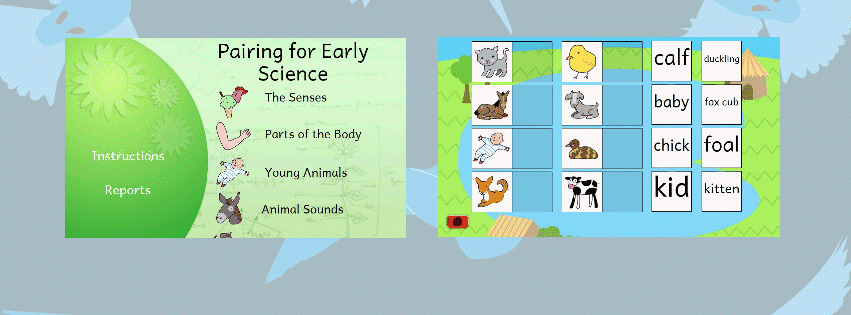
To become familiar with the main parts of the body, children drag the component parts and labels onto a picture. It also covers inner organs, the face, the senses, and the skeleton. Click for demo.
Apps page intro text
These app versions are developments of the Early Science range.
These activities are available for iPad tablets, Apple Macs and for Google Chrome. Details of each title are shown below, and in
some cases there are free demo versions of the apps available here.
Seeds to Plants
In Seeds to Plants, some sunflower seeds have been planted in a garden, and children need to choose the weather on each day to help the seeds grow into large plants with flowers.
Seeds to Plants is a simulation activity, which allows children to see the results of their choices: the seeds may grow into large beautiful flowers, but care is not taken, the sunflowers can die from being exposed to the cold, or from too much sun!
The activity starts with sunflower seeds planted in the brown patch of earth.Children then select one of the types of weather from the right of the screen for each day. To do this, move the mouse to one of the weather symbols, and drag it to the sky before releasing the mouse. The day is then completed, and you will see how the seeds have grown.
Children will be able to view a chart showing the choices made on each day and in the Control Menu, there is an option to include a “measuring stick” (shown above) which will enable children to record the height of the plants on each day.
Apps for iPads and Macs
We create app versions of the activities in the early Science range to run on iPad tablets, Apple Mac (for sale in the iTunes Stores) and for Google chrome (for sale in the Chrome Store), which are described in more detail here.
Early Science by Storm
Our newest software program (available on CD-rom and online) will help children discover the early concepts of science. It covers a number of topics, each of which is covered by series of “on screen” interactive simulation of experiments. Find out more 
Plant Nursery
In the Plant Nursery, children grow tomato plants in a barn, with the aim of growing as many, large tomatoes as possible. The tomatoes can be watered, have fertilizer added, be pruned, and the barn can have the blinds opened or closed and the temperature adjusted.
Children will be able to see the effects of their choices, and within a number of days, small flowers and then tomatoes will appear on the plants. There will be an indication of the expected yield of tomatoes once the plants reach a certain size, and there will also be warnings shown about any problems.
Children would be encouraged to keep a record of their plants’ growth, for example, children could use the recording table to record their selection on each day, and on every third day or so, the expected yield. Children could also add a decription about the state of the plants, including key events, such as the first yellow flowers and the first red tomatoes.
Make a Sundial
Make a Sundial allows children to investigate the way shadows cast by the sun move and change size during the day to reflect the position and height of the sun in the sky. In the activity, a sundial is created, which can be used to tell the time.
In the first part of Make a Sundial, children place pebbles to indicate position of the shadow every hour during the day; and in the second part, children use the sundial to tell the time. At the easy level, the pebbles are already placed for the children.
Once all the pebbles have been placed, the sundial can be used to tell the time. The sun will be placed in different positions in the sky, and children be asked to work out the time, either by setting the clock, or by typing in the hour. Either digital or analog clocks may be selected using the option menu and Make a Sundial may be used in either English or Spanish
Musical Bottles
In this activity, children investigate how the sound made by tapping a bottle changes as the bottle is filled with water, or as the water is removed.
Several bottles with different levels of water can be used, and children can use these to record a short piece of ‘music’.
Initially, a single bottle is shown in the middle of the screen. If the mouse is moved near the bottle, a drum stick will appear, and clicking the mouse will cause the drum stick to tap the bottle, and the sound of the bottle will be heard. The sound made by tapping the bottle may be changed by filling or removing water from the bottle.
Bottles may be added or removed by clicking on the buttons on the right of the screen. If you have several bottles, different amounts of water can be put in each of them, and they will make different musical notes when the bottles are tapped! When filling bottles to make a range of levels, and different notes, children will need to carefully judge the level in the bottle to fill to, and they make need to empty and refill the bottle at times.
Having bottles with varying levels of water, children can play a simple tune, by tapping on the different bottles! For a bit of fun, the tune made can be recorded and played back.
Looking After Animals
This is a simulation activity which enables children to explore the needs of an animal. Children look after Gemima, a guinea pig who, every day, needs to be given food, water, help with grooming and a form of shelter.
Each day, children need to drag items from the right of the screen and and place them: the food and water should be placed in one of the empty bowls; the water bottle, in the bottle holder; and the brush can be brushed over Gemima (as a clue: Gemima needs more than one bowlful of food a day!).
When children have placed all the items for the day, they should click on the next day icon in the top left corner (this will happen automatically when the fourth bowls has been filled). Gemima will be fed, given water and shelter and groomed as directed.
Children will be given regular feedback on Gemima, for example, if she does not get enough food or water or isn’t groomed regularly, or given something to sleep in. Sometimes these are just warnings, but some can be more serious than others. No harm can come to Gemima in this simulation!